
Search Engine Optimization or SEO, is the practice of improving a website to increase its visibility, optimize it thoroughly and get ranked on any search engine. Yeah the definition went over our heads. Think of an infant who just came into this world, nobody knows his identity up until now. He gradually grows up, claims an identity and becomes a true adult, acquiring education. Now, people kind of know him and he is not just a passerby. That’s one way to describe SEO.
A website is built, then designed and lastly configured to perfection, that’s a type of SEO; also known as on-page-SEO in simpler words. Then, the website works to get indexed by google or other search engine. After getting a rank, the website works to get higher ranking with a specific keyword, the whole process of this is off-page SEO.
This article will help you know about different terms of SEO, its type and the best SEO tools for every purpose. Hopefully, you might be able to learn something new and helpful.
Search Engine Versus Browser
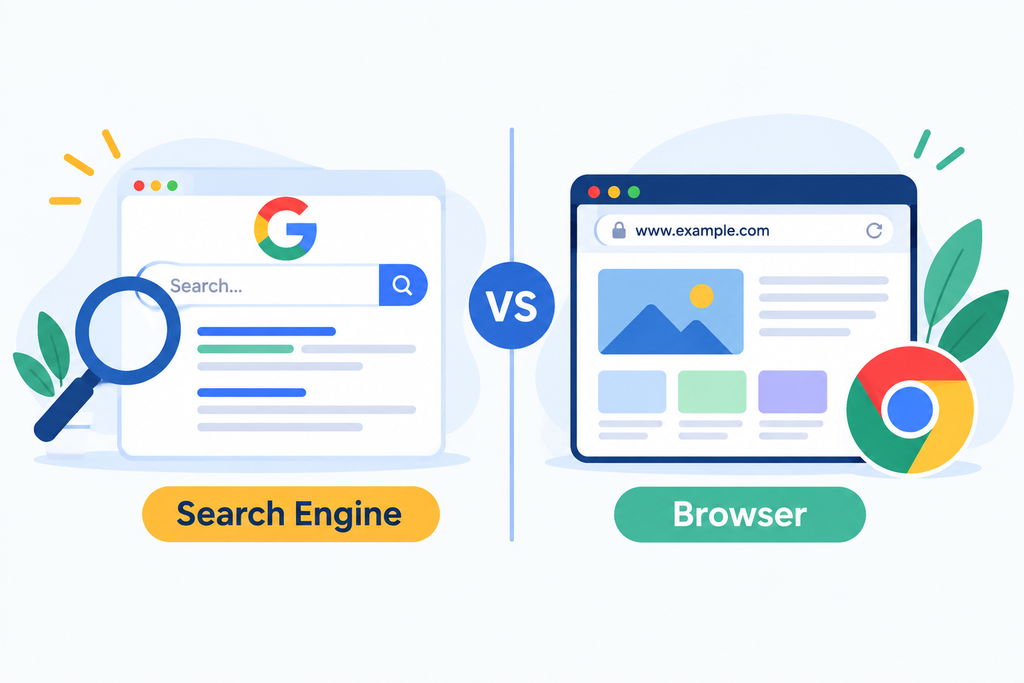
Many people always mix up search engines and browsers. Though they are relevant and interconnected, these two things aren’t the same. For learning about SEO, to know the difference between browser and search engine is very important.
A browser is a software, whereas a search engine is a service. Think of a browser as a planet and search engine is its satellite. Both are dependent on each other for use.
Let us know the stark differences between a browser and search engine –
| Browser | Search Engine |
|---|---|
| A software application used to access the internet. | A website or online service used to find information on the internet. |
| Installation is required before using it. | Installation is not required; it can be accessed through a browser. |
| Some browser features can be used without an internet connection. | It is useless without an internet connection because it needs the internet to search. |
| Can be used to save and download files to your device. | Searches and displays information from websites. |
| Usually, you can type a full website address (URL) to directly visit a website. | You can type phrases, questions, or even incomplete/broken phrases to find relevant answers. |
| Opens and displays websites. | Finds websites and information based on your search. |
| Examples: Google Chrome, Safari, Firefox, Microsoft Edge. | Examples: Google, Microsoft Bing, DuckDuckGo. |
Types of SEO
Based on the techniques being used, SEO can be classified as two types . Mainly,
- White Hat SEO: Doing SEO following the guidelines and regulations of search engines. This is a genuinely 100% authentic way to do SEO. If we follow this method, our website isn’t compromised in any sorts of situation. The site gets properly indexed, and its ranking is authenticated. This reduces the chance of the website getting blocked by Google or other search engine. {Quality content, proper keyword use, good website structure, and natural backlinks.}
- Black Hat SEO: Doing SEO that violates the guidelines and manipulates search engines to forcefully accept our techniques. This is avoided generally since it is not purely authentic. Following this technique, may result in our website getting shut down by Google or other search engine. {Keyword stuffing, hidden text, link schemes, cloaking, and other manipulative practices.}
Based on the whole process of SEO, it is divided into three parts.
- On- page SEO: Optimizing the content and elements within a website or webpage to help search engines understand and rank it. {Keywords, headings, title tags, meta descriptions, content, images, internal links, URL structure.}
- Off-page SEO: Activities performed outside your website to improve its authority, reputation, and rankings. {Backlinks, link building, social sharing, brand mentions, guest posting.}
- Technical SEO: Improving the technical structure and performance of a website so search engines can crawl, index, and understand it properly. {Website speed, mobile-friendliness, XML sitemap, robots.txt, HTTPS, crawlability, indexing}
Easy way to remember:
On-Page = Inside the page
Off-Page = Outside the website
Technical = Behind the website
On page SEO
Keyword Research for SEO
Keyword research is the process of finding and analyzing the words or phrases people type into search engines when they are looking for information, products, or services.
It helps us understand what people are searching for and choose the right keywords to target in our content.
Certain terms to remember-
- Search Volume (SV): The estimated number of times a keyword is searched in a specific period, usually per month. Higher SV generally means more potential traffic.
- Search Difficulty (SD): A metric that estimates how difficult it may be to rank for a keyword in search results. Lower SD usually means easier competition.
- Cost Per Click (CPC) :The average amount advertisers pay for one click on an advertisement for a particular keyword. Higher CPC can indicate stronger commercial/advertising value.
- Allinurl :A Google search operator used to find pages containing all specified words in their URL. Example:
allinurl:digital marketing - Allintitle : A Google search operator used to find pages containing all specified words in their page title. Example:
allintitle:digital marketing
Keyword Researching Tools
- Ubersuggest Chrome Extension
- Keyword Surfer Chrome Extension
- Keyword Research Chrome Extension
- Ahrefs Chrome Extension
- Semrush

The KGR method
KGR (Keyword Golden Ratio) is a keyword research method used to find low-competition keywords that may be easier to rank for, especially for newer or smaller websites. The basic formula is:
KGR = Number of results with the keyword in the title ÷ Search Volume
For example, if a keyword has 20 allintitle results and a monthly search volume of 100:
KGR = 20 ÷ 100 = 0.20
| KGR Score | Category | What it means |
|---|---|---|
| Below 0.25 | Golden | Very low competition; generally the best KGR opportunity |
| 0.25–1.00 | Silver | Moderate competition; still worth considering |
| Above 1.00 | Weak / Lead | Higher competition; usually less attractive for a KGR-focused strategy |
Plugins of SEO tools
What is plugins?
A plugin is a software extension that adds new features or functions to a website without requiring you to build everything from scratch. In WordPress, plugins can be used for design, SEO, security, speed, backups, migration, and many other tasks.
Common wordpress plugins-
| Plugin / Tool | What it does |
|---|---|
| Elementor | A visual page builder that lets you design WordPress pages using drag-and-drop elements without needing to write much code. |
| Rank Math | An SEO plugin that helps optimize pages and posts for search engines, including keywords, meta titles, descriptions, sitemaps, and other SEO settings. |
| Yoast SEO | A popular SEO plugin that helps optimize content, titles, meta descriptions, XML sitemaps, and other SEO elements. |
| LiteSpeed Cache | A performance and caching plugin that can help improve website loading speed through caching and optimization features. |
| WP File Manager | Allows you to manage website files and folders from inside the WordPress dashboard. |
| WP Migration | Used to migrate or transfer a WordPress website, such as moving a site from one hosting environment to another. |
| Divi | A WordPress visual page builder and theme that allows users to create website layouts using a visual editing interface. |
| WordPress Classic Editor | Provides the traditional WordPress editing interface for creating and editing posts and pages instead of using the newer block editor. |
| All in One SEO (AIOSEO) | An SEO plugin that provides tools for optimizing website content, metadata, sitemaps, social settings, and other SEO features. |
| Lightshot | A screenshot tool, rather than a typical WordPress plugin. It allows you to capture, edit, and share screenshots. |
| LiteSpeed | Usually refers to LiteSpeed web server technology; LiteSpeed Cache is the related WordPress plugin used for caching and website optimization. |
| 10Web Booster | A website performance optimization tool designed to improve loading speed and optimize WordPress websites. |
Process of Adding a Plugin in WordPress
Adding a plugin in WordPress is a simple process:
- Log in to your WordPress Dashboard.
- Go to Plugins → Add New Plugin.
- Search for the plugin you want to install, such as Elementor or Rank Math.
- Click Install Now.
- After installation is complete, click Activate.
- Open the plugin’s settings and configure it according to your needs.
- Finally, test the website to make sure the plugin is working properly.
N.B. Only one plugin can be activated at a time.
SEO Process Using Yoast SEO
Yoast SEO is a WordPress plugin that helps optimize your website and content for search engines. A basic SEO process using Yoast can be followed like this:
- Install and activate Yoast SEO
Go to WordPress Dashboard → Plugins → Add New Plugin, search for Yoast SEO, install it, and activate it. - Choose a focus keyphrase
Select the main keyword you want the page or post to rank for. - Add the SEO title
Create a clear title that includes the main keyphrase naturally. - Write a meta description
Add a short and attractive description explaining what the page is about and encouraging people to click. - Optimize the content
Use the keyphrase naturally in important places such as the introduction, headings, and content. Avoid stuffing the keyword unnecessarily. - Optimize the URL (slug)
Keep the URL short, readable, and relevant to the topic. - Check Yoast’s analysis
Yoast provides feedback about SEO and readability. Fix the important issues it identifies while keeping the content natural. - Add internal and external links
Link to relevant pages on your own website and useful, trustworthy external sources when appropriate. - Optimize images
Use relevant image names and descriptive alt text. - Publish and monitor
After making the necessary improvements, publish the page and monitor its performance through tools such as Google Search Console.
Easy formula
Keyword → Title → Meta Description → Content → URL → Yoast Analysis → Links → Images → Publish → Monitor
Advantages of SEO
- Increases visibility – Helps your website appear higher in search engine results.
- Brings organic traffic – Attracts visitors without paying for every click.
- Cost-effective – Can generate long-term traffic without the continuous cost of paid advertisements.
- Targets the right audience – Helps reach people who are actively searching for your products, services, or information.
- Builds credibility – Higher search visibility can make a website appear more trustworthy and authoritative.
- Supports long-term growth – Well-optimized content can continue bringing visitors over time.
- Improves user experience – SEO encourages better website speed, mobile-friendliness, navigation, and content.
- Helps understand users – Keyword and search data can show what people are interested in and searching for.
How I feel about SEO {as a student}
SEO, or Search Engine Optimization, is the process of improving a website so people can find it more easily through search engines like Google. When I first came across SEO, it seemed like a collection of complicated terms, keywords, links, rankings, and tools. The basic idea is much simpler. A person searches for something online, and SEO helps a website appear when that search matches what the website offers. SEO involves choosing useful keywords, improving website content, fixing technical problems, making pages easier to understand, and building credibility. Tools make this work easier.
Google Search Console shows how a website performs in Google Search. Google Analytics helps track website visitors and their actions. Yoast SEO and Rank Math help optimize WordPress content and pages. Keyword research tools help find the words and phrases people actually search for. Page speed tools help identify problems that make a website slow. I find SEO interesting because the work does not end when you publish a page. You look at the results, find what needs improvement, make changes, and keep learning from the data.
Conclusion
SEO is much more than simply adding keywords to a website. From understanding search engines and keyword research to on-page, off-page, and technical SEO, every part plays an important role in helping a website grow. This article has covered the basic concepts you need to understand how SEO works. But there is still much more to explore, especially when it comes to applying these techniques to a real website. In the next article, we will go deeper into the practical side of SEO and explore how these strategies can actually be used to improve a website’s visibility and ranking. Stay tuned for the next part!