
Build Your Dream Website Today
Create a Professional Online Presence with Ease
A website is one of the most powerful tools for sharing information, promoting a business, showcasing your skills, or selling products online. Whether you are a student, freelancer, entrepreneur, or business owner, having a well-designed website helps you reach a wider audience and establish credibility. With today’s website-building tools, creating a professional website has become easier than ever before.
No coding knowledge is required to get started. Platforms like WordPress and Elementor allow anyone to design beautiful, responsive websites using simple drag-and-drop features. With the right planning and creativity, you can build a website that reflects your goals and connects with visitors from around the world.
What is a Website?
A website is a collection of interconnected web pages that are accessible through the internet using a web browser. Websites are used to share information, provide services, promote businesses, display portfolios, publish blogs, and even sell products online. Every website has a unique domain name that allows users to access it from anywhere in the world.
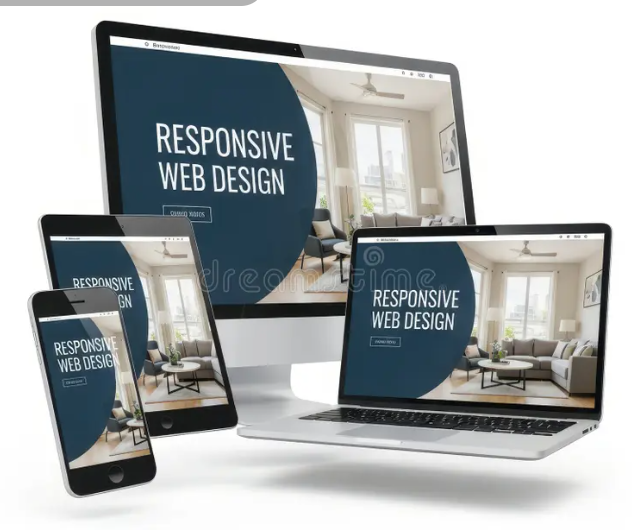
Modern websites are designed to work smoothly on desktops, tablets, and mobile phones. A good website is easy to navigate, visually appealing, and provides valuable information to visitors. Today, websites are essential for businesses, educational institutions, organizations, and individuals who want to build an online presence.
Whether it is a personal blog, an online store, a news portal, or a company website, every successful website is created with the user’s experience in mind. Clear navigation, attractive design, and fast loading speed all contribute to a better browsing experience.
Why Every Business Needs a Website
Reach More Customers
A website allows businesses to connect with customers beyond their local area. People from different cities and countries can learn about products and services at any time of the day.
Build Trust and Credibility
Customers often search online before making a purchase. A professional website with clear information, contact details, and customer testimonials helps build confidence and trust.
Grow Your Business
A website serves as a powerful marketing tool. Businesses can promote products, publish updates, collect customer inquiries, and increase sales through effective online strategies.
Types of Websites
E-commerce Website
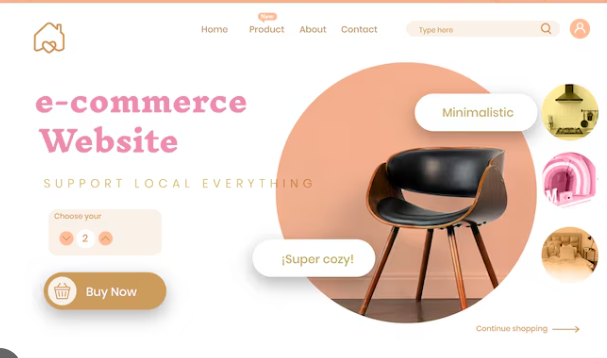
An e-commerce website is designed for buying and selling products or services over the internet. These websites allow customers to browse products, compare prices, add items to a shopping cart, and complete purchases using secure online payment methods. Popular features include product categories, customer reviews, order tracking, wish lists, and multiple payment options…
Blog Website

A blog website focuses on sharing articles, tutorials, news, opinions, and educational content with readers. Bloggers regularly publish fresh content to inform, educate, or entertain their audience. Blog websites often include categories, tags, search functionality, and comment sections that encourage readers to interact with the content.
Business Website
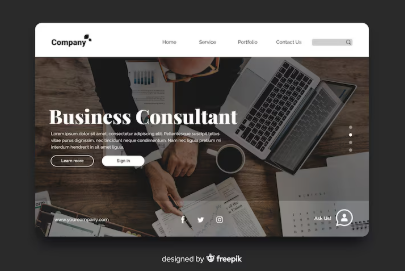
A business website represents a company or organization on the internet. It provides information about the company’s products, services, history, achievements, contact details, and customer support. A professional business website helps create a positive first impression and allows potential customers to learn about the company before making a purchase or inquiry. Many business websites also include service pages, team profile etc.
Portfolio Website

A portfolio website is created to showcase an individual’s or company’s work, skills, and achievements. It is commonly used by photographers, graphic designers, web developers, artists, architects, writers, and freelancers who want to display completed projects and attract potential clients or employers. A portfolio website usually features high-quality images, project descriptions, client testimonials, personal information, and contact details.
Learn Website Creation Through Video
Watching a step-by-step tutorial is one of the fastest and most effective ways to learn website development. Video tutorials make complex concepts easier to understand by demonstrating each step in real time, from choosing a domain name and installing WordPress to designing pages with Elementor and publishing a complete website.
Whether you are a beginner or someone looking to improve your skills, educational videos provide practical guidance that you can follow at your own pace. You can pause, replay, and practice each lesson while building your own website. Combining written guides with video tutorials helps reinforce your understanding and makes learning more enjoyable.
With thousands of free tutorials available online, anyone can start creating professional websites without needing advanced programming knowledge. Consistent practice and hands-on experience will help you become more confident in designing attractive, responsive, and user-friendly websites.
Step-by-Step Guide to Creating a Website
Step 1 – Plan Your Website
Before creating a website, decide its purpose. Think about your target audience and the type of information you want to provide. Planning your pages, choosing a suitable color scheme, and preparing your content will save time during the design process.
Step 2 – Choose a Domain & Hosting
A domain name is your website’s address on the internet, while web hosting stores all your website files. Choose a short, memorable domain name and a reliable hosting provider to ensure good performance and security.
Step 3 – Install WordPress
WordPress is one of the world’s most popular Content Management Systems (CMS). Most hosting providers offer one-click WordPress installation, allowing beginners to set up their websites quickly without technical knowledge.
Step 4 – Design with Elementor
Elementor is a powerful drag-and-drop page builder that makes website design simple. You can add headings, images, buttons, videos, galleries, and many other elements without writing code. With Elementor, creating beautiful and responsive web pages becomes fast and enjoyable.
Step 5 – Add Content and Optimize for SEO
Now it’s time to add your website content. Create informative pages, upload high-quality images, and organize your information clearly. Optimize each page with descriptive headings, keywords, image alt text, and meta descriptions to improve your website’s visibility in search engines. Good content and SEO help attract more visitors.
Step 6 – Preview and Publish Your Website
Before launching your website, carefully preview every page to ensure everything works correctly on desktop, tablet, and mobile devices. Check links, images, spelling, and page speed. Once you’re satisfied with the design and functionality, click Publish to make your website available to the world. Continue updating your website regularly to keep it fresh, secure, and relevant.
Frequently Asked Questions
Do I need coding knowledge to create a website?
No. Modern website builders like WordPress and Elementor allow users to create professional websites using drag-and-drop tools. Beginners can design pages, add content, and customize layouts without writing any code.
What is WordPress?
WordPress is a Content Management System (CMS) that helps users create, manage, and publish websites easily. It is widely used because it is flexible, beginner-friendly, and supports thousands of themes and plugins.
What is Elementor?
Elementor is a visual page builder for WordPress that allows users to create beautiful websites by simply dragging and dropping elements such as text, images, videos, buttons, and forms. It eliminates the need for complex coding.
Wanna Know More?
Join Us Today
Get In Touch With Us
We’d Love to Hear From You
Whether you have a question about website creation, WordPress, Elementor, or digital marketing, we’re here to help. Feel free to contact us using the information below or send us a message through the contact form. We aim to respond to all inquiries as quickly as possible.
Building a successful website starts with asking the right questions. Whether you’re a beginner creating your first website or looking to improve an existing one, don’t hesitate to reach out. Let’s work together to bring your ideas to life.